Keyboard Shortcuts & Application Settings
Speed up your daily charting workflow with verified keyboard shortcuts and tailor performance, updates, exchanges, and diagnostics in Settings (Ctrl + P).
1. Complete Keyboard Shortcuts
Panels, Windows & Workspace
| Shortcut | Action |
|---|---|
| Ctrl + N | Open New Chart Tab |
| Ctrl + S | Save Workspace |
| Ctrl + O | Load Workspace |
| Ctrl + K | Open Quick Symbol Search |
| Ctrl + I | Open Quick Indicator Search |
| Ctrl + M | Toggle Market Watch Panel |
| Ctrl + Shift + N | Toggle Navigator Panel |
| Ctrl + D | Toggle Data Window |
| Ctrl + T | Toggle AI Copilot Sidebar |
| Ctrl + Shift + S | Capture Branded Screenshot |
| Ctrl + P | Open Settings / Options |
| F1 | Open Keyboard Shortcuts Reference |
| F11 | Toggle Fullscreen |
Chart Zoom & Navigation
| Shortcut | Action |
|---|---|
| Alt + Drag | Box Zoom into any selected area |
| Alt + Z | Undo Last Zoom Step |
| Ctrl + + / Mouse Wheel Up | Zoom In |
| Ctrl + - / Mouse Wheel Down | Zoom Out |
| Ctrl + 0 | Reset Zoom & Auto-Fit Price Scale |
| Home / End | Jump to Oldest / Latest Bar |
Drawing Management
| Shortcut | Action |
|---|---|
| Alt + D | Toggle Drawing Toolbar |
| Ctrl + Shift + D | Open Drawing Manager |
| Delete | Remove Selected Drawing |
| Ctrl + Z / Ctrl + Y | Undo / Redo Drawing |
2. Application Settings Overview (Ctrl + P)
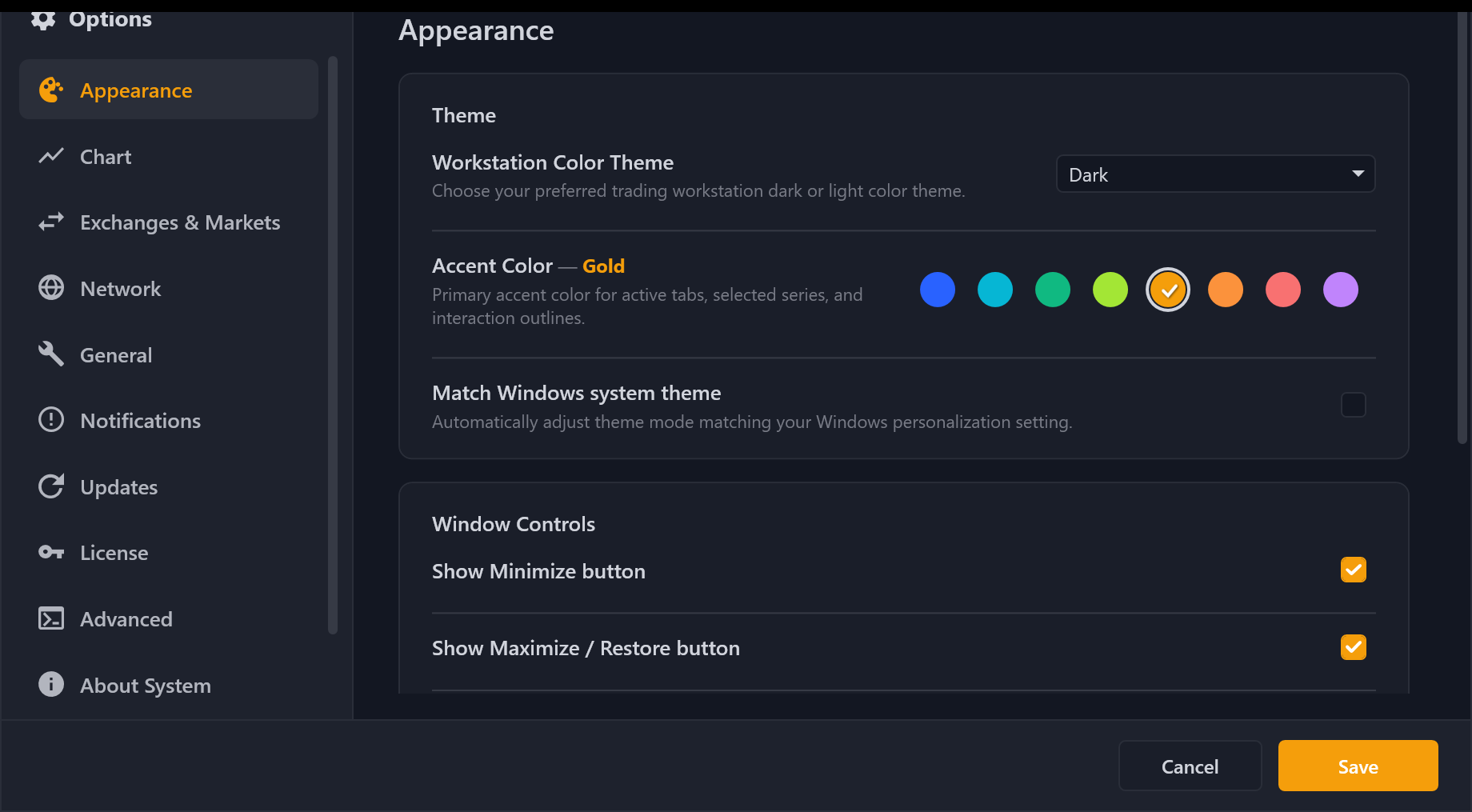
Open Settings via Tools → Options, the gear icon on the right toolbar, or Ctrl + P:
- Appearance: Choose Theme (
Dark,Midnight,CyberNavy,Light), Accent Color, Windows system theme sync, and window caption controls. - Chart: Configure default exchange/pair/timeframe, candle history buffer (
5,000–50,000+), FPS limit, and price guide line visibility. - Exchanges & Markets: Enable/disable any of the 29 CryptoClients.Net exchanges, filter supported market types (
Spot,Perp, etc.), and manage optional exchange API keys. - Network: Configure HTTP / SOCKS5 Proxy routing (applied immediately to all exchange REST and WebSocket clients without restart).
- General: Choose Language (
English/Tiếng Việt), startup workspace restore, Developer Mode toggle, and Privacy & Diagnostics (opt-out toggle for anonymous Sentry crash reporting). - Notifications: Enable audio alerts and configure Telegram Bots (supports Auto Detect Chat ID and Test Connection through proxy).
- Updates: Switch between Stable and Beta channels, configure background auto-download/auto-restart, allow channel downgrades, or click Check for Updates Now.
- License: View your 28-day Pro trial countdown, copy your Machine ID, activate Pro online or via offline signed license key, or switch editions.
- Advanced (Enable Developer Mode in General): Set rolling Serilog verbosity (
app-*.log), toggle runtimeCryptoClients.NetREST/Socket/Raw SDK logs, and export sanitized Diagnostics.zipbundles. - About System: Inspect current build version, chart engine details, and quick links to the public Releases, SDK, and Docs repositories.